Please beware of external links. Support will only be handled on this forum.
Manifold employees will have a Manifold Team badge next to their name.
In order for our team to investigate a bug/errors, please provide the following:
0xDE203e26f91C33D9a9507a26A49a62650aCb9a91
I have delisted my manifold conract nfts off fnd and want to add to manifold studio, when I go to list and sign wallet I get this notification. “EthAppNftNotSupported”.
Thanks for reaching out — happy to help get this sorted.
A couple of quick questions to better understand what’s going on:
Could you share a link to the NFT you’re trying to add to Manifold Studio? A Foundation or OpenSea link works perfectly.
Which wallet are you using with Manifold Studio? Is it a Ledger by any chance? If so, could you try updating the firmware via Ledger Live and let us know if that resolves the issue? You can follow Ledger’s official guide here: https://support.ledger.com/article/4410960111889-zd
Once we have this info, we can dig in further if needed.
The EthAppNftNotSupported error is coming from your Ledger device, not from Manifold — it means the Ledger’s Ethereum app is blocking the transaction signature.
Even after updating firmware, there’s one more setting to check:
On your Ledger, open the Ethereum app
Go to Settings within the app
Enable “Blind signing” (or “Debug data” on older firmware versions)
This allows your Ledger to sign contract interactions that it can’t fully parse on-screen, which is required for Manifold’s listing transactions.
If that still doesn’t resolve it, we’d recommend reaching out to Ledger Support directly — they can help troubleshoot device-specific signing issues: https://support.ledger.com
Let us know how it goes!
Hi, yes I have my ledger set up correctly. This is a Manifold marketplace issue. On further research this is what I have found out. Recapping:
The NFT was minted on my Manifold ERC-721 creator contract
It is currently held in my wallet
It has not been sold (only previously listed on Foundation and since removed)
I am now attempting to list it via Manifold Studio
Error received:
EthAppNftNotSupported
Issue:
It appears that Manifold Marketplace does not support listing already-minted ERC-721 tokens unless they were created through a specific Manifold “Sell” or app-based flow.
Expectation:
As the contract owner, I expected to be able to:
List any NFT from my own contract
Sell directly via Manifold’s marketplace interface
Maintain a fully self-sovereign sales flow without relying on external marketplaces
Clarification requested:
Could you please confirm:
Whether listing existing ERC-721 tokens (minted outside a Sell/Claim flow) is supported or planned
If there is any way to attach a sale/listing to an already minted token
Whether this limitation is intentional or a current product gap
Goal:
I would like to use Manifold as both my minting and primary sales platform for 1/1 works, without needing to rely on external marketplaces.
Hey, Thanks for the thorough write-up — I want to make sure we get this right for you.
The EthAppNftNotSupported error is specifically thrown by your Ledger’s Ethereum app (not by Manifold). It occurs when the Ethereum app version on your Ledger device is too old to support NFT clear-signing. This is a known issue across the web3 ecosystem — not specific to Manifold. For example, Memeland holders have reported the exact same error when transferring NFTs using a Ledger Nano S. I know you mentioned you’ve already updated everything, but firmware and the Ethereum app are separate updates . Here’s what to double-check:
Open Ledger Live on your computer
Go to My Ledger (the manager tab)
Look for the Ethereum (ETH) app specifically — make sure it shows the latest version
If an update is available, install it
After updating, reopen the Ethereum app on your Ledger device before retrying
If you’re already on the latest Ethereum app version and still hitting this, try removing and reinstalling the Ethereum app via Ledger Live — that can sometimes fix corrupted installs. If the issue persists after that, we’d recommend reaching out to Ledger Support directly as it would be a device-specific issue on their end.
Let us know how it goes!
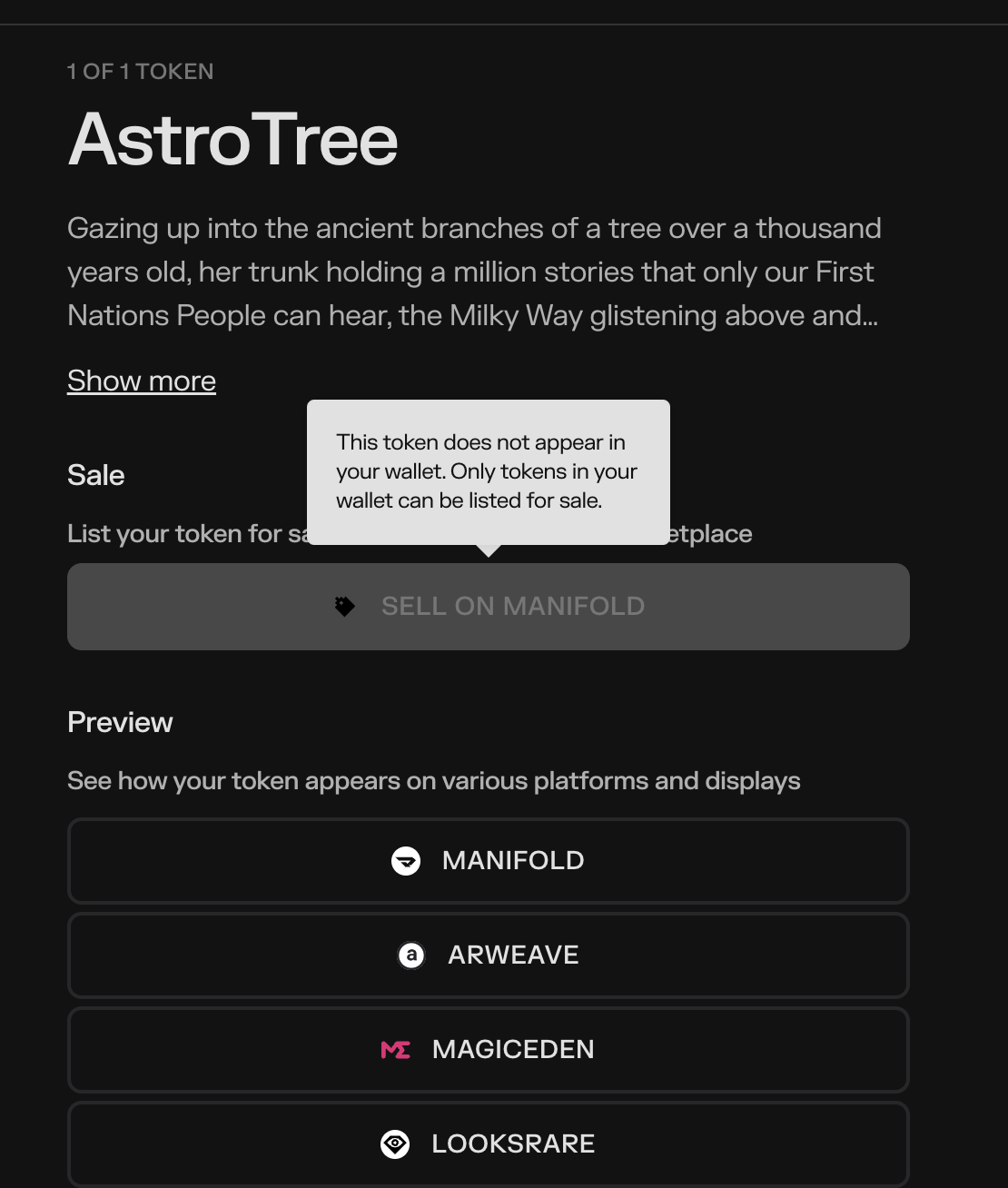
Hi buddy, unfortunatky that is incorrect, the issue starts before I even attempt to add it Manifold Studio. The screen shot added matches the information I have previously provided. As I have said earlier, many friends in the space that I have contacted have ZERO issues using the same ledger as mine.
This is a contract flow issue - it says in your hover info.
 Please beware of external links. Support will only be handled on this forum.