What is your wallet address?
0x4cc1a03191ddf0c39d82098f059ef3412113a36e
A summary of the issue
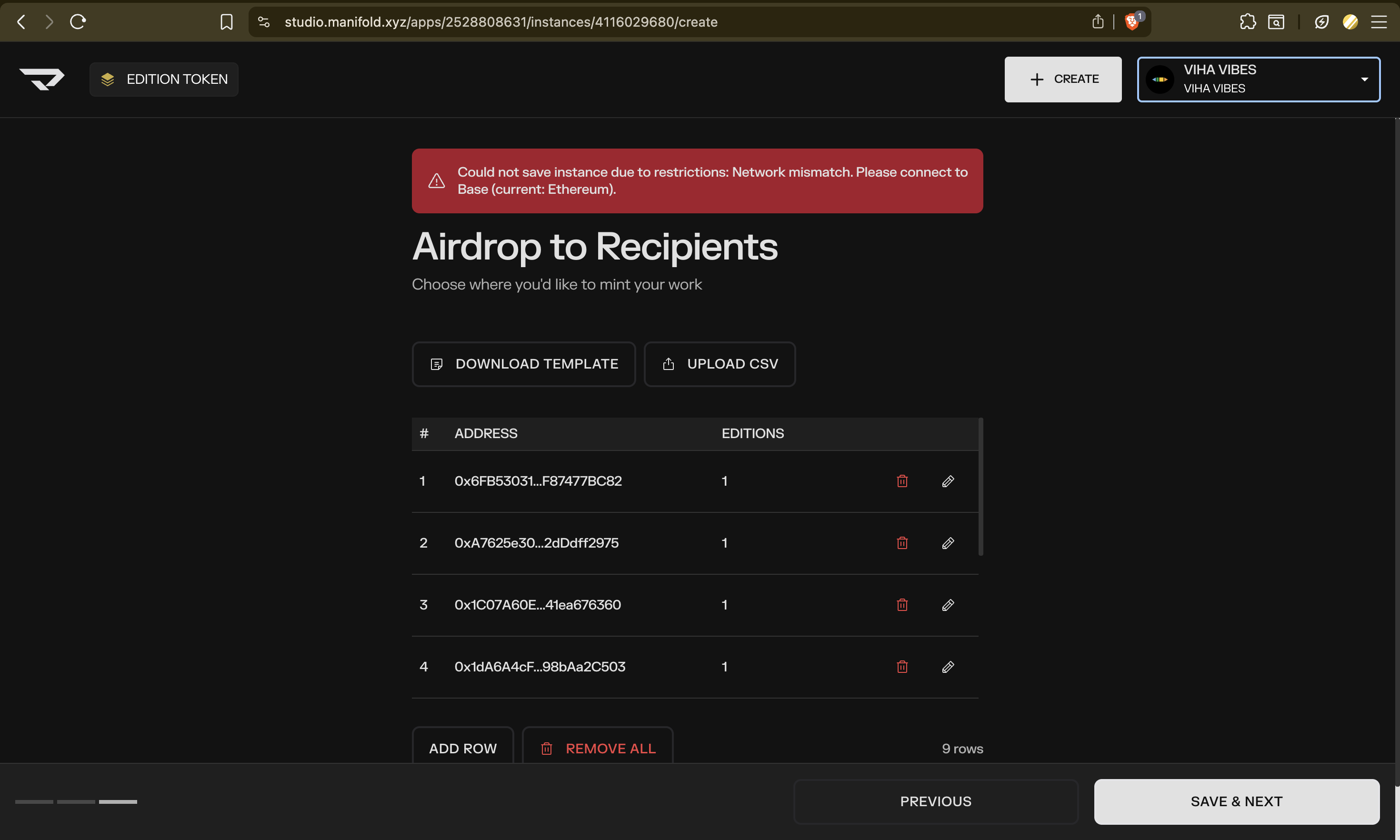
I wanted to mint new work on my existing Base editions contract. Stuck at the airdrop csv upload stage.
What are you trying to do?
Was able to upload the artwork, metadata and the airdrop csv list. But could not save and proceed to the next step.
What is the actual outcome? Are you seeing any error messages?
Error displayed: “Could not save instance due to restrictions. Network mismatch. Please connect to base (current: ethereum)”
Despite being connected to Base network, this error is displayed.
A screenshot of the issue/error with the console.
What browser are you using?
Brave browser (on Mac OS)
What wallet are you using?
Metamask (Other wallet extensions are disabled)
— Current page —
— Other details —
{
“reportedFrom”: “Studio Header User Menu”,
“timestamp”: “2025-11-18T11:09:49.080Z”
}
— Browser Details —
{
  "userAgent": "Mozilla/5.0 (Macintosh; Intel Mac OS X 10_15_7) AppleWebKit/537.36 (KHTML, like Gecko) Chrome/142.0.0.0 Safari/537.36",
  "screenResolution": "1680x1050",
  "windowSize": "1470x838",
  "isMetamask": true,
  "isRainbow": false,
  "isCoinbaseWallet": false,
  "isLedgerConnect": false,
  "isBitski": false,
  "isDawn": false
}